顯示具有 Java 標籤的文章。 顯示所有文章

2014年12月19日 星期五

JVM Monitoring using SNMP in Cacti

Cacti 是個監控工具,可以透過 SNMP 監控主機的運行狀態,預設可以監控 OS 的 CPU、Memory、Disk、Network usage,這裡我們說明透過 JVM-MANAGEMENT-MIB 讓 JVM 也能被 Cacti 監控。

步驟:
  1. 在被監控端安裝 snmpd,參考:Monitoring Performance with Net-SNMP
  2. 在監控端安裝 Cacti,CentOS / Fedora 用戶直接執行 yum install cacti。
  3. 啟動 JVM SNMP 功能,在執行 java command 加上:
    1. -Dcom.sun.management.snmp.port=1610
    2. -Dcom.sun.management.snmp.acl.file=snmp.acl
  4. snmp.acl 從 $JAVA_HOME/jre/lib/management/snmp.acl.template 複製,將最後的 acl、trap 區塊 uncomment。
  5. 修改 snmpd.conf,加上 proxy -v 2c -c public localhost:1610 .1.3.6.1.4.1.42。
  6. 複製 jvm_mem_pool.xmljvm_gc.xml 到 Cacti 的 snmp_queries 目錄下。
  7. 到 Cacti 的管理介面匯入 cacti_host_template_jvm_snmp_host.xml
  8. 成功匯入後會看到 Host Templates 多了一個名為 JVM SNMP Host 的 template,其下有:
    1. Associated Graph Templates
      1. JVM - Classes Count
      2. JVM - Heap Usage
      3. JVM - NonHeap Usage
      4. JVM - Thread Usage
    2. Associated Data Queries
      1. JVM - Garbage Collection Query
      2. JVM - Memory Pool Query
      3. SNMP - Get Mounted Partitions
      4. SNMP - Get Processor Information
      5. SNMP - Interface Statistics
  9. 在 Cacti 新增 Device 時,Host Template 選取 JVM SNMP Host。
  10. 相關檔案可在 https://github.com/linuschien/Cacti 取得。
  11. 範例 JVM Heap Memory Usage 圖:

2013年4月23日 星期二

Send mail by Spring Integration gateway through Rabbit MQ

Maven dependency
<dependency>
  <groupId>org.springframework.integration</groupId>
  <artifactId>spring-integration-mail</artifactId>
  <version>2.2.3.RELEASE</version>
</dependency>

<dependency>
  <groupId>javax.mail</groupId>
  <artifactId>mail</artifactId>
  <version>1.4.6</version>
</dependency>

<dependency>
  <groupId>org.springframework.integration</groupId>
  <artifactId>spring-integration-amqp</artifactId>
  <version>2.2.3.RELEASE</version>
</dependency>
Gateway interface
import org.springframework.integration.annotation.Gateway;
import org.springframework.integration.annotation.Header;
import org.springframework.integration.annotation.Payload;
import org.springframework.integration.mail.MailHeaders;

public interface SendMail {

  @Gateway(requestChannel = "input")
  void send(@Header(MailHeaders.FROM) String from, @Header(MailHeaders.TO) String to, @Header(MailHeaders.SUBJECT) String subject, @Payload String message);

}
Spring configuration
<?xml version="1.0" encoding="UTF-8"?>
<beans xmlns="http://www.springframework.org/schema/beans" xmlns:xsi="http://www.w3.org/2001/XMLSchema-instance"
  xmlns:int="http://www.springframework.org/schema/integration" xmlns:int-mail="http://www.springframework.org/schema/integration/mail"
  xmlns:int-amqp="http://www.springframework.org/schema/integration/amqp" xmlns:rabbit="http://www.springframework.org/schema/rabbit"
  xsi:schemaLocation="http://www.springframework.org/schema/integration/amqp http://www.springframework.org/schema/integration/amqp/spring-integration-amqp.xsd
    http://www.springframework.org/schema/integration/mail http://www.springframework.org/schema/integration/mail/spring-integration-mail.xsd
    http://www.springframework.org/schema/integration http://www.springframework.org/schema/integration/spring-integration.xsd
    http://www.springframework.org/schema/rabbit http://www.springframework.org/schema/rabbit/spring-rabbit.xsd
    http://www.springframework.org/schema/beans http://www.springframework.org/schema/beans/spring-beans.xsd">

  <rabbit:connection-factory id="rabbitConnectionFactory" host="xxx.xxx.xxx.xxx" virtual-host="/linus" username="linus_chien" password="xxx" />

  <int-amqp:channel id="input" connection-factory="rabbitConnectionFactory" queue-name="linus.test" />

  <int-mail:outbound-channel-adapter id="mailAdaptor" channel="input" host="xxx.xxx.xxx.xxx" />

  <int:gateway id="sendMail" service-interface="SendMail" />

</beans>
Test Case
import org.junit.Test;
import org.junit.runner.RunWith;
import org.springframework.beans.factory.annotation.Autowired;
import org.springframework.test.context.ContextConfiguration;
import org.springframework.test.context.junit4.SpringJUnit4ClassRunner;

@RunWith(SpringJUnit4ClassRunner.class)
@ContextConfiguration
public class SpringIntegrationTest {

  @Autowired
  private SendMail sendMail;

  @Test
  public void test() {
    sendMail.send("linus_chien@xxx.xxx.xxx.xxx", "linus_chien@xxx.xxx.xxx.xxx", "Test", "This is a gateway annotation test.");
  }

}
就這樣沒寫什麼程式就可以發信了。

2013年1月31日 星期四

ModelMapper

我會選用ModelMapper有以下幾個特點:
  1. 具convention
  2. 可configuration (例如可選擇用field或是method來mapping)
  3. 支援generic types
  4. 使用Embedded Domain Specific Language (EDSL) 自訂mapping規則
  5. High performance (http://code.google.com/p/modelmapper/wiki/Performance)

2013年1月30日 星期三

Java Scripting API

JDK在1.6版之後新增了Scripting API,預設已經內含著名的JavaScript Engine Rhino,所以我們不需要再額外下載Rhino就可以在Java內部執行JavaScript。
Test Case:
import static org.junit.Assert.assertEquals;
import javax.script.ScriptEngine;
import javax.script.ScriptEngineManager;
import javax.script.ScriptException;
import org.junit.Test;

public class JavaScriptEngineFactoryTest {

    @Test
    public void test() throws ScriptException {
        ScriptEngine engine = new ScriptEngineManager().getEngineByName("JavaScript");
        engine.put("x", 10);
        engine.put("y", 20);
        assertEquals(30.0, engine.eval("x + y"));
    }

}

2013年1月29日 星期二

Data Driven Testing by JUnit Theories

JUnit Theories是另外一種實現Data Driven Testing的方式,它的強項在於它會自動排列組合所有@DataPoint和@DataPoints的data傳入test method裡面,然後我們可以搭配Assume過濾掉一些不合理的情境。

以下是一個使用Theories的test case:
IdentificationNumberValidatorTheoriesTest
package com.gss.gmo.cao.validator.constraints.impl;

import static org.junit.Assert.assertFalse;
import static org.junit.Assert.assertTrue;
import static org.junit.Assume.assumeFalse;
import static org.junit.Assume.assumeTrue;

import java.util.ArrayList;
import java.util.Collection;

import org.junit.BeforeClass;
import org.junit.experimental.theories.DataPoints;
import org.junit.experimental.theories.Theories;
import org.junit.experimental.theories.Theory;
import org.junit.runner.RunWith;

@RunWith(Theories.class)
public class IdentificationNumberValidatorTheoriesTest {

    @DataPoints
    public static DataBean[] identificationNumber;

    @BeforeClass
    public static void prepareData() {
        Collection<DataBean> data = new ArrayList<DataBean>();
        data.add(new DataBean(true, null));
        data.add(new DataBean(false, ""));
        data.add(new DataBean(false, "1qazxsw2"));
        data.add(new DataBean(true, "H120178472"));
        data.add(new DataBean(true, "h120178472"));
        data.add(new DataBean(false, "h120178470"));
        identificationNumber = data.toArray(new DataBean[] {});
    }

    private IdentificationNumberValidator identificationNumberValidator = new IdentificationNumberValidator();

    @Theory
    public void testTrue(DataBean data) {
        assumeTrue(data.isResult());
        assertTrue(identificationNumberValidator.isValid(data.getIdentificationNumber(), null));
    }

    @Theory
    public void testFalse(DataBean data) {
        assumeFalse(data.isResult());
        assertFalse(identificationNumberValidator.isValid(data.getIdentificationNumber(), null));
    }

    static class DataBean {

        private final boolean result;

        private final String identificationNumber;

        DataBean(boolean result, String identificationNumber) {
            this.result = result;
            this.identificationNumber = identificationNumber;
        }

        public boolean isResult() {
            return result;
        }

        public String getIdentificationNumber() {
            return identificationNumber;
        }

    }
}

Data Driven Testing by JUnit Parameterized Tests

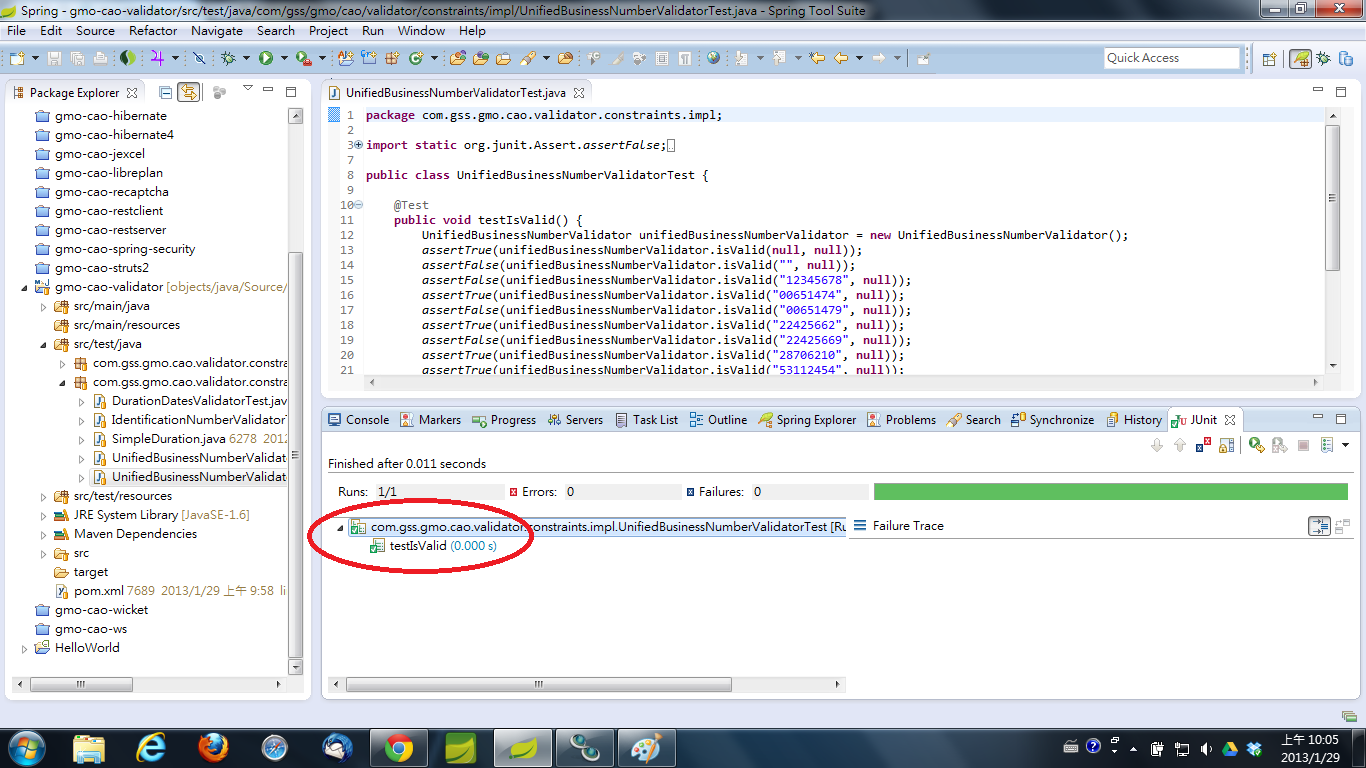
本文直接展示兩種unit test的寫法來比較JUnit Parameterized Tests的好處在哪。

首先是傳統的寫法:
UnifiedBusinessNumberValidatorTest
package com.gss.gmo.cao.validator.constraints.impl;

import static org.junit.Assert.assertFalse;
import static org.junit.Assert.assertTrue;

import org.junit.Test;

public class UnifiedBusinessNumberValidatorTest {

    @Test
    public void testIsValid() {
        UnifiedBusinessNumberValidator unifiedBusinessNumberValidator = new UnifiedBusinessNumberValidator();
        assertTrue(unifiedBusinessNumberValidator.isValid(null, null));
        assertFalse(unifiedBusinessNumberValidator.isValid("", null));
        assertFalse(unifiedBusinessNumberValidator.isValid("12345678", null));
        assertTrue(unifiedBusinessNumberValidator.isValid("00651474", null));
        assertFalse(unifiedBusinessNumberValidator.isValid("00651479", null));
        assertTrue(unifiedBusinessNumberValidator.isValid("22425662", null));
        assertFalse(unifiedBusinessNumberValidator.isValid("22425669", null));
        assertTrue(unifiedBusinessNumberValidator.isValid("28706210", null));
        assertTrue(unifiedBusinessNumberValidator.isValid("53112454", null));
        assertTrue(unifiedBusinessNumberValidator.isValid("04607774", null));
        assertTrue(unifiedBusinessNumberValidator.isValid("22446771", null));
        assertTrue(unifiedBusinessNumberValidator.isValid("22515072", null));
        assertTrue(unifiedBusinessNumberValidator.isValid("22595770", null));
        assertTrue(unifiedBusinessNumberValidator.isValid("22227375", null));
        assertTrue(unifiedBusinessNumberValidator.isValid("07006628", null));
    }

}
執行結果:

接下來我們利用JUnit Parameterized Tests的寫法改寫一次這個unit test:
UnifiedBusinessNumberValidatorParameterizedTest
package com.gss.gmo.cao.validator.constraints.impl;

import static org.junit.Assert.assertEquals;

import java.util.ArrayList;
import java.util.Collection;

import org.junit.Test;
import org.junit.runner.RunWith;
import org.junit.runners.Parameterized;
import org.junit.runners.Parameterized.Parameters;

/**
 * @author linus_chien
 *
 */
@RunWith(value = Parameterized.class)
public class UnifiedBusinessNumberValidatorParameterizedTest {

    @Parameters(name = "[{index}]: [{1}] is valid? [{0}]")
    public static Collection<Object[]> data() {
        Collection<Object[]> data = new ArrayList<Object[]>();
        data.add(new Object[] { Boolean.TRUE, null });
        data.add(new Object[] { Boolean.FALSE, "" });
        data.add(new Object[] { Boolean.FALSE, "12345678" });
        data.add(new Object[] { Boolean.TRUE, "00651474" });
        data.add(new Object[] { Boolean.FALSE, "00651479" });
        data.add(new Object[] { Boolean.TRUE, "22425662" });
        data.add(new Object[] { Boolean.FALSE, "22425669" });
        data.add(new Object[] { Boolean.TRUE, "28706210" });
        data.add(new Object[] { Boolean.TRUE, "53112454" });
        data.add(new Object[] { Boolean.TRUE, "04607774" });
        data.add(new Object[] { Boolean.TRUE, "22446771" });
        data.add(new Object[] { Boolean.TRUE, "22515072" });
        data.add(new Object[] { Boolean.TRUE, "22595770" });
        data.add(new Object[] { Boolean.TRUE, "22227375" });
        data.add(new Object[] { Boolean.TRUE, "07006628" });
        return data;
    }

    private final boolean result;

    private final String unifiedBusinessNumber;

    public UnifiedBusinessNumberValidatorParameterizedTest(Boolean result, String unifiedBusinessNumber) {
        this.result = result;
        this.unifiedBusinessNumber = unifiedBusinessNumber;
    }

    @Test
    public void test() {
        UnifiedBusinessNumberValidator unifiedBusinessNumberValidator = new UnifiedBusinessNumberValidator();
        assertEquals(result, unifiedBusinessNumberValidator.isValid(unifiedBusinessNumber, null));
    }

}
執行結果:

從執行結果我們可以發現每一筆資料都變成一個test case,而且可以從名稱上了解測試資料內容,這樣在test case failed的時候可以很清楚知道是哪筆資料出錯,從報表上就可以一目瞭然。

須注意的是@Parameters可以下name attribute是4.11版之後才支援。

2013年1月24日 星期四

JExcelApi Cell Mapper

本文將解說如何設計一組annotation和API,我命名為Cell Mapper,讓開發人員只要在POJO上面標記想要對應到Excel的欄位位置,就可以自動匯出Excel或是從Excel讀取資料,底層的library使用老牌的JExcelApi。

首先定義interface:
CellMapper
package com.gss.gmo.cao.jexcel;

import java.util.List;

import jxl.Workbook;
import jxl.write.WritableWorkbook;
import jxl.write.WriteException;

import com.gss.gmo.cao.jexcel.read.ReadException;

/**
 * @author linus_chien
 *
 */
public interface CellMapper {

    /**
     * Read the sheet according to the model class.
     *
     * @param workbook
     * @param modelClass
     * @return
     * @throws ReadException
     */
    <Model> List<Model> read(Workbook workbook, Class<Model> modelClass) throws ReadException;

    /**
     * Write the sheet according to the model class.
     *
     * @param workbook
     * @param data
     * @param modelClass
     * @throws WriteException
     */
    <Model> void write(WritableWorkbook workbook, List<Model> data, Class<Model> modelClass) throws WriteException;

}
這裡利用method level generic type保留彈性。

因為JExcelApi沒有定義ReadException,所以我們自訂一個:
ReadException
package com.gss.gmo.cao.jexcel.read;

import jxl.JXLException;

/**
 * @author linus_chien
 *
 */
public class ReadException extends JXLException {

    private static final long serialVersionUID = 1L;

    public ReadException(String message) {
        super(message);
    }

}

接下來定義兩個annotation,@Sheet和@Column:
@Sheet
package com.gss.gmo.cao.jexcel.annotation;

import java.lang.annotation.Documented;
import java.lang.annotation.ElementType;
import java.lang.annotation.Retention;
import java.lang.annotation.RetentionPolicy;
import java.lang.annotation.Target;

/**
 * Excel sheet.
 *
 * @author linus_chien
 *
 */
@Documented
@Retention(RetentionPolicy.RUNTIME)
@Target(ElementType.TYPE)
public @interface Sheet {

    /**
     * @return sheet name
     */
    String name();

}
@Column
package com.gss.gmo.cao.jexcel.annotation;

import java.lang.annotation.Documented;
import java.lang.annotation.ElementType;
import java.lang.annotation.Retention;
import java.lang.annotation.RetentionPolicy;
import java.lang.annotation.Target;

/**
 * Excel column.
 *
 * @author linus_chien
 *
 */
@Documented
@Retention(RetentionPolicy.RUNTIME)
@Target(ElementType.FIELD)
public @interface Column {

    /**
     * @return column index, numbered from 0
     */
    int index();

    /**
     * @return column title
     */
    String title();

}

然後我們做兩個type converter,分別將JExcelApi的Cell轉換成Java type,以及將Java type轉換成WritableCell:
CellTypeReader
package com.gss.gmo.cao.jexcel.read;

import java.util.Date;

import jxl.Cell;
import jxl.CellType;
import jxl.DateCell;
import jxl.LabelCell;
import jxl.NumberCell;

/**
 * Read cell content by cell type.
 *
 * @author linus_chien
 *
 */
public class CellTypeReader {

    /**
     * @param cell
     * @return
     */
    public String read(LabelCell cell) {
        return cell.getString();
    }

    /**
     * @param cell
     * @return
     */
    public Double read(NumberCell cell) {
        return cell.getValue();
    }

    /**
     * @param cell
     * @return
     */
    public Date read(DateCell cell) {
        return cell.getDate();
    }

    /**
     * @param cell
     * @return
     */
    public Object read(Cell cell) {
        CellType cellType = cell.getType();
        if (cellType == CellType.LABEL) {
            return read((LabelCell) cell);
        } else if (cellType == CellType.NUMBER) {
            return read((NumberCell) cell);
        } else if (cellType == CellType.DATE) {
            return read((DateCell) cell);
        } else {
            return cell.getContents();
        }
    }

}
WritableCellFactory
package com.gss.gmo.cao.jexcel.write;

import java.util.Date;

import jxl.write.Blank;
import jxl.write.DateTime;
import jxl.write.Label;
import jxl.write.WritableCell;

import org.apache.commons.lang3.StringUtils;

/**
 * Create WritableCell instance by value type.
 *
 * @author linus_chien
 *
 */
public class WritableCellFactory {

    /**
     * @param col
     * @param row
     * @param value
     * @return Label or Blank
     */
    public WritableCell create(int col, int row, String value) {
        if (StringUtils.isBlank(value)) {
            return create(col, row);
        } else {
            return new Label(col, row, value);
        }
    }

    /**
     * @param col
     * @param row
     * @param value
     * @return jxl.write.Number or Blank
     */
    public WritableCell create(int col, int row, Number value) {
        if (value == null) {
            return create(col, row);
        } else {
            return new jxl.write.Number(col, row, value.doubleValue());
        }
    }

    /**
     * @param col
     * @param row
     * @param value
     * @return DateTime or Blank
     */
    public WritableCell create(int col, int row, Date value) {
        if (value == null) {
            return create(col, row);
        } else {
            return new DateTime(col, row, value);
        }
    }

    /**
     * @param col
     * @param row
     * @param value
     * @return Label or jxl.write.Number or DateTime or Blank
     */
    public WritableCell create(int col, int row, Object value) {
        if (value == null) {
            return create(col, row);
        } else if (value instanceof String) {
            return create(col, row, (String) value);
        } else if (value instanceof Number) {
            return create(col, row, (Number) value);
        } else if (value instanceof Date) {
            return create(col, row, (Date) value);
        } else {
            return create(col, row, value.toString());
        }
    }

    /**
     * @param col
     * @param row
     * @return Blank
     */
    public WritableCell create(int col, int row) {
        return new Blank(col, row);
    }

}

重頭戲,利用這組annotation實作的Cell Mapper implementation:
AnnotationCellMapperImpl
package com.gss.gmo.cao.jexcel.impl;

import java.lang.reflect.Field;
import java.util.ArrayList;
import java.util.HashMap;
import java.util.List;
import java.util.Map;

import jxl.Cell;
import jxl.Sheet;
import jxl.Workbook;
import jxl.write.WritableSheet;
import jxl.write.WritableWorkbook;
import jxl.write.WriteException;

import org.apache.commons.beanutils.BeanUtils;
import org.springframework.util.ReflectionUtils;

import com.gss.gmo.cao.jexcel.CellMapper;
import com.gss.gmo.cao.jexcel.annotation.Helper;
import com.gss.gmo.cao.jexcel.read.CellTypeReader;
import com.gss.gmo.cao.jexcel.read.ReadException;
import com.gss.gmo.cao.jexcel.write.WritableCellFactory;

/**
 * Depend on annotation.
 *
 * @author linus_chien
 *
 */
public class AnnotationCellMapperImpl implements CellMapper {

    /**
     * Helper instance.
     */
    private Helper helper = new Helper();

    /**
     * WritableCellFactory instance.
     */
    private WritableCellFactory factory = new WritableCellFactory();

    /**
     * CellTypeReader instance.
     */
    private CellTypeReader reader = new CellTypeReader();

    @Override
    public <Model> List<Model> read(Workbook workbook, Class<Model> modelClass) throws ReadException {
        List<Model> results = new ArrayList<Model>();
        if (helper.isClassWithSheetAnnotation(modelClass)) {
            List<Field> fields = helper.getAnnotatedFields(modelClass);
            Sheet sheet = getSheet(workbook, modelClass);
            for (int row = 1; row < sheet.getRows(); row++) {
                Map<String, Object> data = new HashMap<String, Object>();
                for (Field field : fields) {
                    int col = helper.getAnnotatedColumnIndex(field);
                    Cell cell = sheet.getCell(col, row);
                    data.put(field.getName(), reader.read(cell));
                }
                try {
                    Model model = modelClass.newInstance();
                    BeanUtils.populate(model, data);
                    results.add(model);
                } catch (Exception e) {
                    e.printStackTrace();
                    throw new ReadException(e.getMessage());
                }
            }
        }
        return results;
    }

    @Override
    public <Model> void write(WritableWorkbook workbook, List<Model> datas, Class<Model> modelClass) throws WriteException {
        if (!helper.isClassWithSheetAnnotation(modelClass)) {
            return;
        }
        List<Field> fields = helper.getAnnotatedFields(modelClass);
        WritableSheet sheet = createSheet(workbook, modelClass);
        for (Field field : fields) {
            int col = helper.getAnnotatedColumnIndex(field);
            sheet.addCell(factory.create(col, 0, helper.getAnnotatedColumnTitle(field)));
        }
        for (int row = 0; row < datas.size(); row++) {
            Model data = datas.get(row);
            for (Field field : fields) {
                int col = helper.getAnnotatedColumnIndex(field);
                ReflectionUtils.makeAccessible(field);
                Object value = ReflectionUtils.getField(field, data);
                sheet.addCell(factory.create(col, row + 1, value));
            }
        }
    }

    /**
     * @param workbook
     * @param modelClass
     * @return WritableSheet
     */
    private WritableSheet createSheet(WritableWorkbook workbook, Class<?> modelClass) {
        String sheetName = helper.getAnnotatedSheetName(modelClass);
        WritableSheet sheet = workbook.createSheet(sheetName, workbook.getNumberOfSheets());
        return sheet;
    }

    /**
     * @param workbook
     * @param modelClass
     * @return
     */
    private Sheet getSheet(Workbook workbook, Class<?> modelClass) {
        String sheetName = helper.getAnnotatedSheetName(modelClass);
        Sheet sheet = workbook.getSheet(sheetName);
        return sheet;
    }

}
Helper
package com.gss.gmo.cao.jexcel.annotation;

import java.lang.reflect.Field;
import java.util.ArrayList;
import java.util.List;

import org.apache.commons.lang3.StringUtils;

/**
 * Help CellMapper to retrieve annotation data.
 *
 * @author linus_chien
 *
 */
public class Helper {

    /**
     * @param modelClass
     * @return
     */
    public boolean isClassWithSheetAnnotation(Class<?> modelClass) {
        return modelClass.isAnnotationPresent(Sheet.class);
    }

    /**
     * @param modelClass
     * @return
     */
    public String getAnnotatedSheetName(Class<?> modelClass) {
        String sheetName;
        Sheet sheetAnnotation = modelClass.getAnnotation(Sheet.class);
        if (StringUtils.isBlank(sheetAnnotation.name())) {
            sheetName = modelClass.getSimpleName();
        } else {
            sheetName = sheetAnnotation.name();
        }
        return sheetName;
    }

    /**
     * @param modelClass
     * @return
     */
    public List<Field> getAnnotatedFields(Class<?> modelClass) {
        List<Field> annotatedFields = new ArrayList<Field>();
        Field[] fields = modelClass.getDeclaredFields();
        for (Field field : fields) {
            if (field.isAnnotationPresent(Column.class)) {
                annotatedFields.add(field);
            }
        }
        return annotatedFields;
    }

    /**
     * @param field
     * @return
     */
    public String getAnnotatedColumnTitle(Field field) {
        String title;
        Column columnAnnotation = field.getAnnotation(Column.class);
        if (StringUtils.isBlank(columnAnnotation.title())) {
            title = field.getName();
        } else {
            title = columnAnnotation.title();
        }
        return title;
    }

    /**
     * @param field
     * @return
     */
    public int getAnnotatedColumnIndex(Field field) {
        Column columnAnnotation = field.getAnnotation(Column.class);
        return columnAnnotation.index();
    }

}

最後是一個簡單的test case:
AnnotationCellMapperImplTest
package com.gss.gmo.cao.jexcel.impl;

import java.io.ByteArrayInputStream;
import java.io.ByteArrayOutputStream;
import java.util.ArrayList;
import java.util.Date;
import java.util.List;

import junit.framework.Assert;
import jxl.Workbook;
import jxl.write.WritableWorkbook;

import org.junit.AfterClass;
import org.junit.BeforeClass;
import org.junit.Test;

import com.gss.gmo.cao.jexcel.CellMapper;
import com.gss.gmo.cao.jexcel.annotation.Column;
import com.gss.gmo.cao.jexcel.annotation.Sheet;

public class AnnotationCellMapperImplTest {

    private static ByteArrayOutputStream os;
    private static ByteArrayInputStream is;

    @BeforeClass
    public static void setUpBeforeClass() throws Exception {
        os = new ByteArrayOutputStream();
    }

    @AfterClass
    public static void tearDownAfterClass() throws Exception {
        os.close();
        is.close();
    }

    @Test
    public void testWrite() throws Exception {
        WritableWorkbook workbook = Workbook.createWorkbook(os);
        CellMapper cellMapper = new AnnotationCellMapperImpl();
        List<User> users = new ArrayList<User>();
        User u1 = new User();
        u1.setName("Linus");
        u1.setAge(36);
        u1.setBirthday(new Date());
        users.add(u1);
        User u2 = new User();
        u2.setName("Mime");
        u2.setAge(35);
        u2.setBirthday(new Date());
        users.add(u2);
        cellMapper.write(workbook, users, User.class);
        workbook.write();
        workbook.close();
    }

    @Test
    public void testRead() throws Exception {
        is = new ByteArrayInputStream(os.toByteArray());
        Workbook workbook = Workbook.getWorkbook(is);
        CellMapper cellMapper = new AnnotationCellMapperImpl();
        List<User> users = cellMapper.read(workbook, User.class);
        Assert.assertEquals("Linus", users.get(0).getName());
        Assert.assertEquals("Mime", users.get(1).getName());
        workbook.close();
    }

    @Sheet(name = "User")
    public static class User {
        @Column(index = 0, title = "姓名")
        private String name;
        @Column(index = 1, title = "年齡")
        private int age;
        @Column(index = 2, title = "生日")
        private Date birthday;

        public String getName() {
            return name;
        }

        public void setName(String name) {
            this.name = name;
        }

        public int getAge() {
            return age;
        }

        public void setAge(int age) {
            this.age = age;
        }

        public Date getBirthday() {
            return birthday;
        }

        public void setBirthday(Date birthday) {
            this.birthday = birthday;
        }

        @Override
        public String toString() {
            return "User [name=" + name + ", age=" + age + ", birthday=" + birthday + "]";
        }
    }

}

2013年1月23日 星期三

Precondition of Design by Contract

如果在callee裡面要做precondition的話,我們可以使用org.apache.commons.lang3.Validate,在method一開始執行就進行arguments的驗證,並且丟出合理易懂的exception,避免method執行到很後面時才拋出不太容易理解的exception,也減少stack trace的複雜性有助於debug。

2013年1月14日 星期一

Jasypt: Java Simplified Encryption

Jasypt是一組幫助加、解密的Java API,它不只是方便,和Spring、Spring Security、Hibernate等熱門的framework有著高度的整合,使用起來非常的方便。

Spring in Action, 3rd Edition的14.1 Externalizing configuration中也特別提到Jasypt,算是得到社群相當的認同。

Project Lombok

Project Lombok是一組compile Annotation API,它可以幫助我們利用Annotation就generate code出來,一方面讓我們少寫一些制式的code,另外一方面也可以省去refactor的麻煩。
以一個Entity class來說,通常就必須要有getter / setter,邏輯上也可能需要equals / hashCode,為了方便debug又可能需要override toString,這些都是Lombok的基本功能。

以一個Entity class為例,使用Lombok之後程式會像下方範例一樣:
代碼:
import java.util.List;
import javax.persistence.Column;
import javax.persistence.Embedded;
import javax.persistence.Entity;
import javax.persistence.Id;
import org.hibernate.annotations.Filter;
import org.hibernate.annotations.Type;
import lombok.EqualsAndHashCode;
import lombok.Getter;
import lombok.Setter;
import lombok.ToString;

import com.gss.gmo.cao.base.BaseDto;
import com.gss.gmo.cao.hibernate.audit.AuditInfo;

/**
 * @author linus_chien
 *
 */
@Getter
@Setter
@EqualsAndHashCode(callSuper = false, of = { "id" })
@ToString
@Entity
@Filter(name = "personFilter", condition = "name like :name and address is null")
public class Person extends BaseDto {

    private static final long serialVersionUID = 1L;

    @Id
    private String id;

    @Column
    private String name;

    @Column
    private String address;

    @Embedded
    private AuditInfo auditInfo;

    @Type(type = "listType")
    private List<String> emails;

}
這樣的code看起來是不是簡單明瞭許多呢?
下列是我常用的Annotation:
  1. @Getter / @Setter
  2. @ToString
  3. @EqualsAndHashCode
  4. @SneakyThrows
  5. @CommonsLog
其它做太多事情的就不太建議使用了。

Filter Declaration Order

在J2EE的世界中有越來越多的Framework都使用Filter做為整個功能的入口,但是這些Filter的宣告其實是有前後順序的,如果順序錯了,往往就會造成無法check的錯誤,在這裡我們列舉幾個常用的Filter,並且列出建議的宣告順序。
  1. org.springframework.web.filter.CharacterEncodingFilter
  2. org.springframework.web.filter.DelegatingFilterProxy (Spring Security)
  3. org.springframework.orm.hibernate4.support.OpenSessionInViewFilter
  4. org.apache.struts2.dispatcher.ng.filter.StrutsPrepareAndExecuteFilter (MVC Framework)
通常和Security有關的放上面,OpenSessionInViewFilter要在render JSP時還必須有效,所以要在MVC Framework前面,所以通常MVC Framework就放在最下面。

2013年1月10日 星期四

Mock or Not ?

Mock Utilities固然好用(JMock、EasyMock、Mockito),但是不見得適用於所有的test cases,就以Spring managed bean來說,可以直接implement一個mock bean來inject到test cases裡面(搭配Spring Profile),這樣也符合Spring IoC的特性,讓test cases的程式也乾淨一些。

如果沒辦法做這樣的抽換,表示在開發上Spring IoC的用法可能也不太正確。

2013年1月8日 星期二

快速檢視Single Class Responsibility原則

針對class可以直接檢視import了哪些classes,如果import了太多沒甚麼直接關係的classes,那就表示這個class做了太多事情了。
在Eclipse中可用ctrl + shift + o進行Organize Imports。

針對maven project可以檢視pom.xml,看看dependency libs是不是讓這個project做了太多事情。
前提是不要把用不到的放進來。

ISO8601 & RFC822 日期格式

在訊息交換若是遇到日期格式時,目前會有兩種方式:
  1. ISO8601,例如:2012-12-05T10:55:41.063+08:00
  2. RFC822,例如:2012-12-05T10:55:41.063+0800
兩者的差異只在時區欄位一個有冒號,一個沒有而已。

目前Java在支援這兩種日期格式是有版本上的問題,在Java 6之前只支援RFC822,在Java 7之後才開始支援ISO8601。
  1. Java 7 java.text.SimpleDateFormat
  2. Java 6 java.text.SimpleDateFormat
從Java Docs可以發現,在Java 6裡面Z代表RFC 822 time zone,但是Z這個符號在ISO8601裡面代表Zulu Time,也就是UTC,所以在Java 7新增了X符號代表ISO8601 time zone。
所以兩種格式的樣式如下:
  1. ISO8601:yyyy-MM-dd'T'HH:mm:ss.SSSX
  2. RFC822:yyyy-MM-dd'T'HH:mm:ss.SSSZ
那麼我們要在Java 6之前使用ISO8601該怎麼做呢?

目前JavaScript也都有支援ISO格式:JavaScript Date Object
用這樣的日期格式就可以讓瀏覽器與伺服器之間溝通包含時間的訊息,而不會遺失time zone。

2013年1月5日 星期六

Google J2ObjC: A Java to iOS Objective-C translator

Google真是佛心來的,有了這傢伙,可以擺脫學習Objective-C的問題,把UI交給Cocoa,logic依然交給Java吧。

可可亞爪哇咖啡味道應該不錯吧。

參考資料:
  1. J2ObjC: A Java to iOS Objective-C translator
  2. j2objc
  3. Google推J2ObjC工具:可將Java轉為iOS Objective -C